Comprehensive User Manual
Welcome to the TradePoint platform manual. This document serves as a guide for both standard users (Members) and system administrators, focusing on our Token Distribution and Algorithmic Asset Liquidation features.
Table of Content
1. Introduction
TradePoint is an enterprise-grade Token Distribution & Algorithmic Selling Platform. It is designed to manage the distribution of assets to users and provide sophisticated algorithms for automated asset liquidation and selling, ensuring controlled and efficient market participation.
2. User Guide
Gaining Access
Access to TradePoint is restricted. Your account will be created and managed by a system administrator.
- Signing In: Once your account has been set up, you can securely access your distributed asset overview through the main login portal. Click the Sign in button to log in with your Google account.
- Google Account Required: Please ensure you use the Google account associated with your invitation.
- MetaMask Sign Up: New users may also sign up using MetaMask by clicking the Sign up button on the login page.
- Email Update: If you need to change the email address linked to your account, click the Need to change your email address? link below the sign-in options. This will take you to the email recovery flow.
- Login Help: If you are having trouble logging in, click the Having trouble logging in? link, which will direct you to the FAQ page.
- Enhanced Security: For the safety of your assets, we strongly recommend enabling Two-Factor Authentication within your account settings. This adds an extra layer of protection to your login.
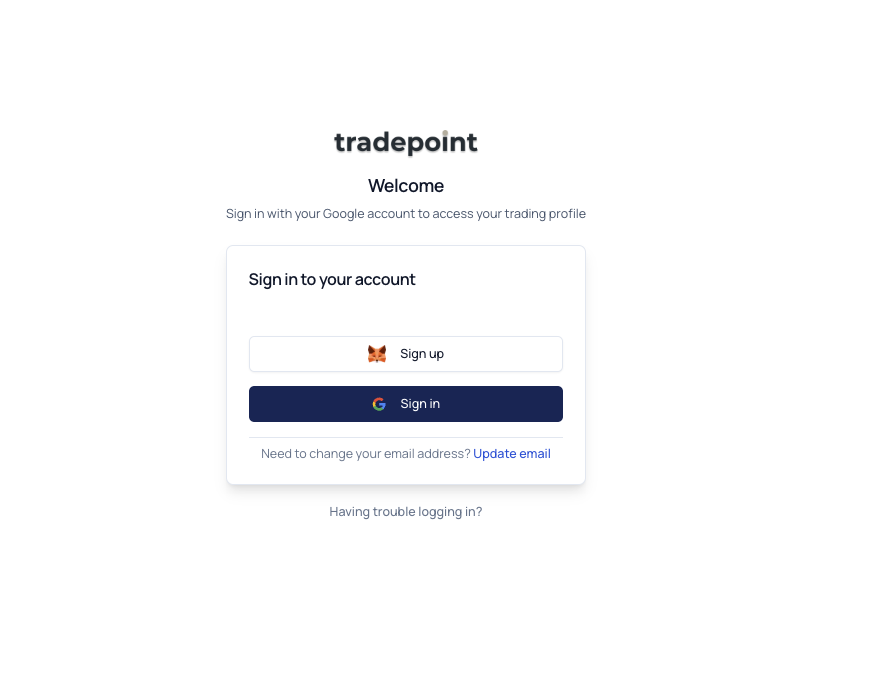
The login page showing the Sign up (MetaMask) and Sign in (Google) options.
Account Settings
Manage your personal profile and security preferences from the Account page.
- Your Profile: View your email address, full name, role, and account status.
- Security: Two authentication methods are shown in the Security section:
- Email Authentication is always active and cannot be disabled.
- TOTP Two-Factor Authentication can be enabled or disabled using an authenticator app. When enabled, you will be prompted for a one-time code after signing in with Google.
- KYC/KYB: To comply with security and regulatory standards, you must verify your identity before receiving distributed tokens or using automated trading features. Start the KYC process directly from the Account page. The page displays your current KYC status, which may be one of: Not Started, Draft, Submitted, Resubmitted, Under Review, Approved, Request More Info, or Rejected. Rejection reasons and reviewer notes are shown when applicable.
- Withdrawal: Access your payout settings from the Account page. A button navigates you to the dedicated Payout page where you can initiate withdrawals and manage your preferred wallet addresses.
- Account Restriction: If your account has been locked by an administrator, a red alert banner will appear at the top of the Account page. You can still view your account information but cannot access other features. Contact support for assistance.
Address Book
The Address Book page (accessible from the Account page) allows you to manage the external wallet addresses where you would like to receive funds.
- Multi-Network Support: Save addresses for the blockchain networks configured by your administrator (e.g., Ethereum, BNB Smart Chain, Base).
- Address Validation: The platform automatically validates address formats for each network and detects tag/memo fields for XRP and Stellar.
- KYC Screenshot: Optionally upload a KYC verification screenshot when adding an address.
- Address Statuses: Each saved address will display one of the following statuses: Pending, Verify Address, Active, Rejected, or Deleted. Only Active addresses can be used for withdrawals.
My Wallet
The My Wallet page provides a real-time view of the assets assigned to you and their current status.
- Summary Strip: View your Total Portfolio Value (including a P&L change indicator showing the amount and percentage change since the last update), Total Trade proceeds, and Total Withdrawal amounts at a glance.
- Start Trading: A prominent button at the top allows you to quickly navigate to your trade configurations.
- My Asset: A detailed table of each token you hold, including its total balance, available balance, current status (Active or Idle), and a context-sensitive action button:
- START — shown for idle tokens not yet trading.
- MANAGE — shown for tokens that are actively being traded.
- WITHDRAW — shown for USDT tokens when withdrawal is configured.
- Vested & Claims: View your vesting schedules and claim available tokens. Each token row is expandable to show vesting details including Total Tokens, Vested amount, Daily Rate, and Claimable tokens.
- Vesting Schedule: Within each expanded token, a detailed vesting schedule table shows each round with its timeline, progress bar, token allocation, distributed and remaining amounts, and status (Active, Pending, or Refund).
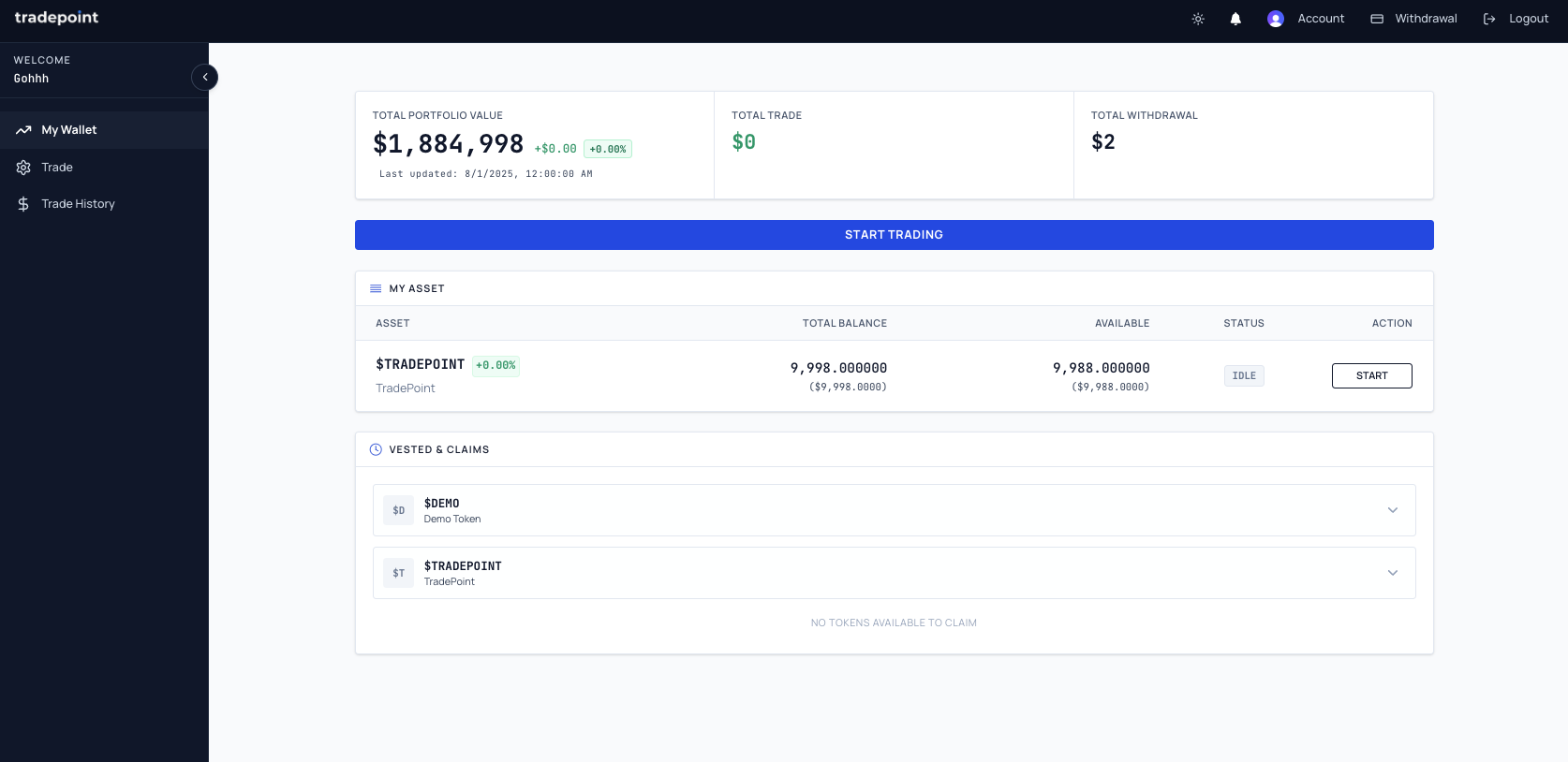
The My Wallet page showing the summary strip, asset table, and vesting status.
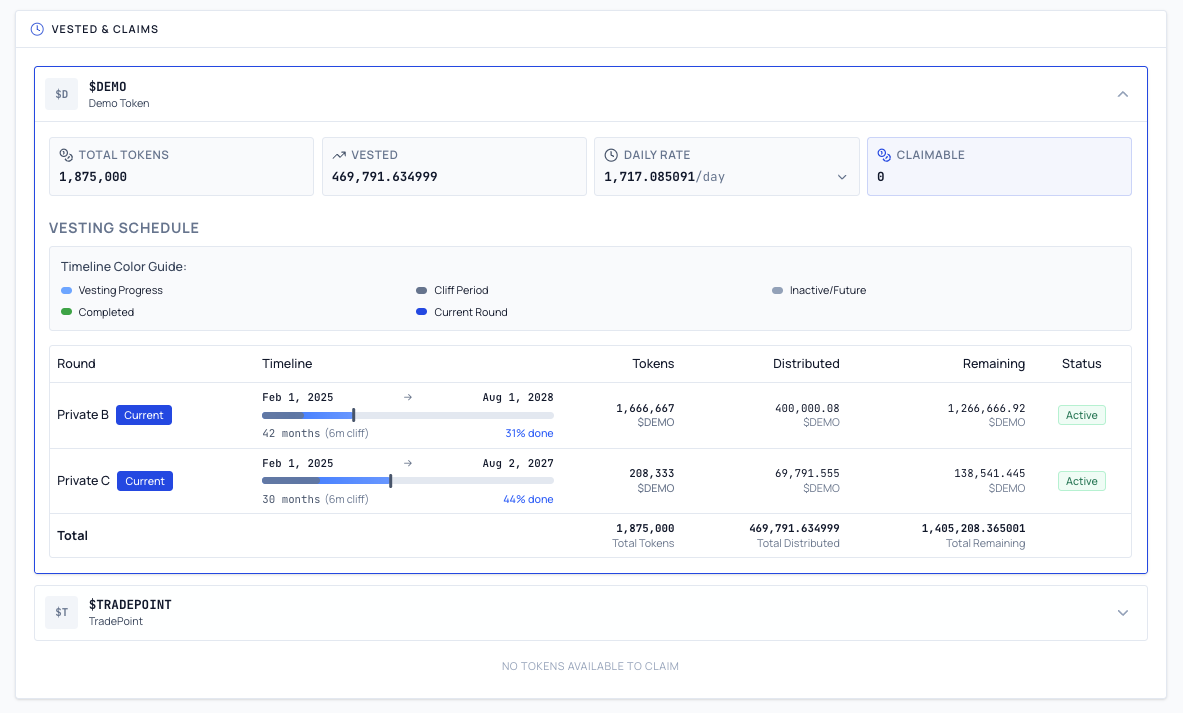
The Vested & Claims section showing vesting schedule details and round progress.
Trade Strategy
The Sales Configuration page allows you to configure your trade strategy. The platform will automatically convert tokens and send proceeds to your account.
- Token & Balance: View each token assigned to you along with the available balance ready for trading.
- Configuration Wizard: Setting up a new trade strategy follows a guided, multi-step wizard:
- Token Selection — Choose the token you want to configure automated selling for.
- Amount & Balance — Specify how much of your available balance to include.
- Settings — Configure maximum token amounts and expiration options.
- Review — Confirm all settings before saving.
- Trading Speed: Choose a trading pace — Conservative, Balanced, or Aggressive — using the interactive slider. The platform uses this setting to determine how aggressively to trade your tokens each day.
- Daily Cut-off: Trades are processed up to the displayed daily cut-off time (shown in your local time with a GMT offset). Configurations saved before the cut-off take effect on the same day.
- Active Configurations: A table below the wizard shows all your currently active configurations, with options to pause, start, edit, or delete each one.
- Pause Trading: You can Pause an active configuration at any time to stop trading temporarily. A confirmation dialog will be shown before pausing to prevent accidental interruptions.
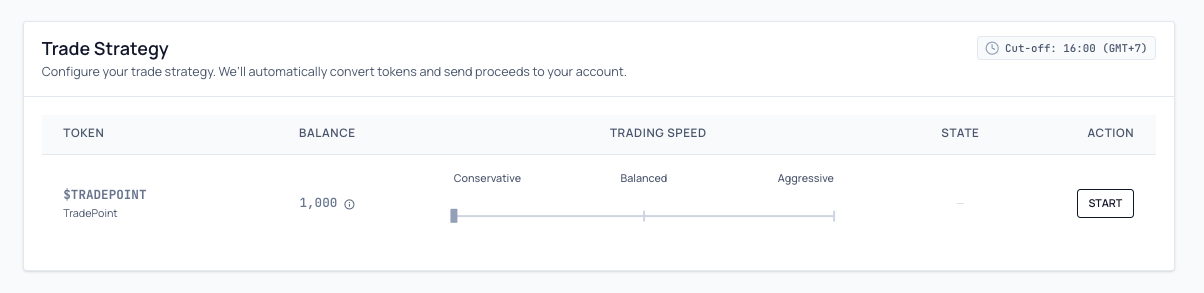
The Sales Configuration page showing the configuration wizard, trading speed slider, and active configurations.
Trade Summary & Analytics
The Rate Analysis page lets you track the performance of your automated trades.
- Stats Cards: View key metrics including Total Traded, Active Streams, Potential Trades, and Ready for Disbursement.
- Token Filter: Select a specific token from the dropdown to view its trade history.
- Period Selector: Choose a time range — Day, Week, Month, or Custom — to view your trade data. Navigation arrows allow you to move between periods. The Custom option includes a date range picker for selecting specific start and end dates.
- Rate Analysis Chart: A chart showing rate trends for your selected token and time period.
- Execution Results Table: A detailed breakdown of each period's trades, including Amount Sold, Amount Bought, and Rate, with a totals row showing cumulative and average figures.
- CSV Export: Download your trade data as a CSV file for your own records or reporting needs, with a customizable date range.
Frequently Asked Questions
Q: How do I get an account? A: Accounts are created manually by platform administrators. If you are a participant in a distribution program, an administrator will set up your account for you.
Q: Can I log in with any email? A: No, you must sign in with a Google account or sign up with MetaMask. The email address associated with your account must match the one used by the administrator when creating your TradePoint profile.
Q: Is TradePoint a trading exchange? A: No, TradePoint is a platform for distributing tokens and enabling you to sell them. You don't trade on an order book; instead, you configure your sale settings and the platform processes the transaction on your behalf.
Q: How does trading work? A: On the Sales Configuration page, set up your trade strategy using the step-by-step wizard, select a trading speed (Conservative, Balanced, or Aggressive), and confirm your configuration. The platform then automatically converts your tokens and sends proceeds to your account based on your configuration, up to the daily cut-off time.
Q: What is a "Vesting Schedule"? A: This is a timeline that shows when the tokens assigned to you will be "unlocked" and become available for claiming and for the automated trading system to use.
Q: How do I enable Two-Factor Authentication? A: Go to the Account page and look for the Security section. You can enable TOTP authentication, which will require a one-time code from an authenticator app (such as Google Authenticator or Authy) each time you sign in.
If you need further assistance, please reach out to your system administrator or the support team.