Sales Guide
A comprehensive guide to automated token selling with flexible speed levels on TradePoint.
1. Introduction
Simple Selling is an automated token selling strategy that lets you choose how fast you want to sell your tokens without worrying about setting exact daily amounts. The platform automatically calculates how much to sell each day based on your chosen speed level.
What Makes Simple Selling Different?
Traditional Selling:
- You set a fixed daily amount (e.g., 1,000 tokens per day)
- Same amount every day until completed
- Requires manual calculation of how long it will take
Simple Selling:
- Choose a speed level: Slow, Medium, or Fast
- Platform automatically calculates daily sell amount based on your balance
- Faster levels = higher percentage sold daily + priority in distribution
- Dynamic adjustment as your balance changes
[!IMPORTANT] Simple Selling is only available for tokens that have been configured by administrators to support this strategy. Check with your admin team if you don't see the option.
2. How Simple Selling Works
The Three-Level System
Simple Selling offers three speed levels to match your selling goals:
| Level | Best For |
|---|---|
| Slow | Conservative selling, long-term exit |
| Medium | Balanced approach |
| Fast | Quick liquidation, urgent selling |
How It Works
When you choose a speed level, our team automatically manages:
- Daily lock amount - A portion of your available balance is locked each day for selling
- Distribution priority - Faster levels receive higher priority in sales distribution
- Selling timeline - The speed level determines how quickly your tokens are sold
[!NOTE] The specific percentages and weights for each level are configured and managed by our operations team. You don't need to worry about the calculations - just choose the speed that matches your selling timeline.
3. Step-by-Step Setup
Prerequisites
Before you can use Simple Selling:
- Token must be configured for Simple Selling by administrators
- You must have available token balance
- Token not already active in a selling strategy
Accessing the Sales Page
Step 1: Navigate to Sales
- Log into your TradePoint account
- Click "Sales" from the main menu
- The Sales page opens showing all your eligible tokens
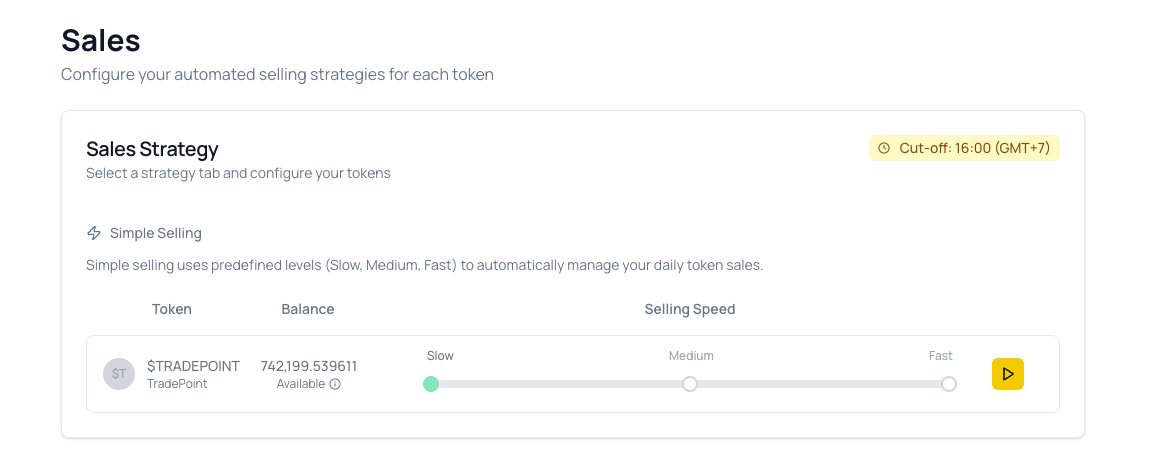
What You'll See:
- Page Title: "Sales" with subtitle "Configure your automated selling strategies for each token"
- Sales Strategy Section: Shows available strategy tabs
- Cut-off Time: Displayed in top right corner (e.g., "Cut-off: 16:00 (GMT+7)")
- Simple Selling Tab: Currently selected strategy
- Token Table: Lists all your eligible tokens with their balances
Configuring Your Selling Speed
Step 2: Find Your Token
All tokens configured for Simple Selling are displayed in the table with:
- Token: Token name and symbol with icon
- Balance: Your available balance for selling
- Selling Speed: Interactive slider to set speed level
Step 3: Choose Your Speed Level
Use the Selling Speed slider to select your preferred selling pace:
Slow (Left Position)
- Best for: Long-term gradual exit
- Locks the smallest daily amount
- Lower priority in sales distribution
- Longest timeline to complete
Medium (Center Position)
- Best for: Balanced approach
- Moderate daily lock amount
- Medium priority in sales distribution
- Balanced timeline
Fast (Right Position)
- Best for: Quick liquidation
- Locks the largest daily amount
- Highest priority in sales distribution
- Fastest timeline to complete
Step 4: Activate Selling
- Adjust the slider to your desired speed level (Slow, Medium, or Fast)
- Click the play button (▶) on the right side of the token row
- Your configuration activates immediately
- Sales will begin processing after the next cut-off time
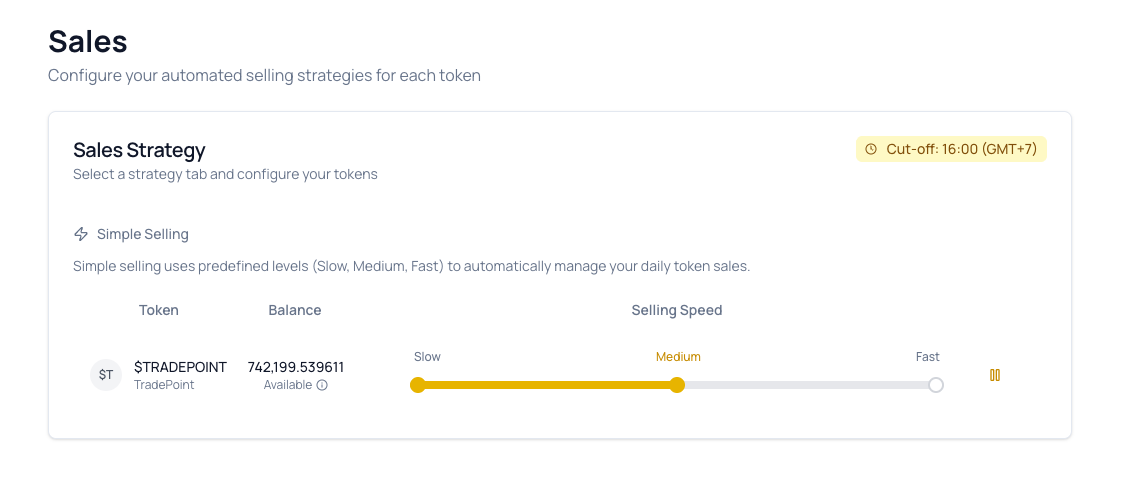
[!TIP] The cut-off time is displayed in the top right corner of the Sales Strategy section. Make sure to activate your configuration before this time to start selling the same day.
4. Understanding the Daily Process
Morning Lock Phase
Time: Runs automatically each morning (check your platform's cut-off time)
What Happens:
Each day, the platform automatically:
- Calculates how much to lock based on your speed level and current balance
- Locks that amount for selling
- Reduces your available balance accordingly
Key Points:
- Lock amount is calculated automatically based on your chosen speed level
- Lock amount decreases as your balance decreases over time
- Locked tokens cannot be used for other purposes until sold or unlocked
- Process happens automatically every day
Final Sale Protection
To ensure efficient trading, the platform has minimum sale thresholds:
When your balance gets low:
- The platform will automatically lock ALL remaining tokens for a final sale
- This prevents inefficiently small trades
- Your configuration completes after this final sale
Our team manages these thresholds to ensure:
- Efficient market execution
- Optimal trading conditions
- Complete selling of your tokens
5. Understanding Sales Distribution
How Sales Are Executed
After tokens are locked each morning, our operations team:
- Sells the locked tokens on the market throughout the day
- Distributes the sale proceeds to users at the end of the day
- Returns any unsold tokens to your available balance
Distribution Priority
Users with different speed levels receive different priority in sales distribution:
Fast Level → Highest priority Medium Level → Medium priority Slow Level → Standard priority
This means that if you choose a faster speed level, you'll receive a larger share of the actual sales relative to your locked amount.
Fair Distribution System
Our team manages a fair distribution system that:
- Prioritizes faster speed levels in allocation
- Ensures all sold tokens are distributed to users
- Redistributes any excess to maximize allocations
- Guarantees no sold tokens are wasted
You don't need to understand the calculation details - our system automatically handles everything to ensure fair and efficient distribution based on your chosen speed level.
6. What Happens to Your Tokens
After Daily Sales
Tokens Sold:
- Converted to proceeds
- Sales fees deducted
- Net proceeds added to your balance
- Available in your account
Tokens Unsold:
- Automatically unlocked after distribution
- Returned to your available balance
- Can be used immediately
- Will be locked again next day (if config still active)
Example Daily Flow
Morning (Lock Phase):
- Platform automatically locks a portion of your available tokens
- Locked amount is based on your chosen speed level
- Your available balance decreases by the locked amount
Afternoon (Platform Sells):
- Our operations team sells locked tokens on the market
- Sales are executed based on market conditions
Evening (Distribution):
- You receive your share of the sales proceeds
- Sales fees are deducted from proceeds
- Net proceeds are added to your balance
- Any unsold tokens are automatically unlocked
- Unlocked tokens return to your available balance
Next Morning:
- Process repeats with your updated available balance
- Cycle continues until configuration is stopped or completed
7. Managing Your Configuration
Viewing Your Selling Configurations
All your tokens and their selling configurations are displayed in the Sales Strategy table on the Sales page. Each token row shows:
| Column | Description |
|---|---|
| Token | Token name, symbol, and icon |
| Balance | Your available balance with "Available" indicator |
| Selling Speed | Interactive slider showing current speed level (Slow/Medium/Fast) |
| Action Button | Play (▶) to start or Pause (⏸) to stop selling |
Managing Active Configurations
Starting Selling:
- Adjust the speed slider to your desired level
- Click the play button (▶) on the right
- Configuration activates immediately
- Sales begin after the next cut-off time
Pausing Selling:
- Locate your active token in the table
- Click the pause button (⏸) on the right
- Current day's sales will complete
- No new sales will occur on future days
- The button changes back to play (▶)
Changing Speed Level:
- If selling is active, pause it first by clicking the pause button
- Adjust the slider to your new desired speed level
- Click play to activate with the new speed
- New speed takes effect after the next cut-off time
[!IMPORTANT] Changing Speed Levels: You can adjust the speed slider at any time, but changes only take effect when you stop and restart the configuration. Always pause first, adjust the slider, then restart.
Configuration Status Indicators
The action button on each token row shows the current status:
Play Button (▶) - Inactive
- Selling is not currently active
- No daily locks occurring
- All tokens remain in available balance
- Click to start selling
Pause Button (⏸) - Active
- Selling is currently active
- Daily locks are processing
- Sales occur after each cut-off time
- Click to pause selling
[!NOTE] The button updates in real-time. If you see the pause button (⏸), your configuration is active and processing daily sales. Click it to stop.
8. Frequently Asked Questions
General Questions
Q: Can I change my speed level after starting?
A: Yes! You can change your speed level at any time:
- Pause your active configuration by clicking the pause button (⏸)
- Adjust the speed slider to your new desired level
- Click play (▶) to restart with the new speed
- The new speed takes effect after the next cut-off time
Q: Which level should I choose?
A:
- Slow: If you want to sell gradually over 7-10 days
- Medium: If you want balanced selling over 4-6 days
- Fast: If you need to sell quickly in 3-4 days or want maximum distribution priority
Q: Will my tokens sell at a guaranteed price?
A: No, the platform determines execution price based on market conditions. You cannot set a minimum sale price.
Lock & Distribution Questions
Q: What if I don't have enough balance on a given day?
A: The platform will lock whatever percentage is available. If your balance falls below the minimum threshold, all remaining tokens will be locked for a final sale.
Q: Why did I receive less than my locked amount?
A: Your allocation depends on several factors:
- Total amount sold by operations (may be less than total locked by all users)
- Your distribution priority based on your chosen speed level
- Fair distribution system managed by our operations team
This is normal - unsold tokens are automatically unlocked and returned to your available balance.
Q: What happens if operations don't sell any tokens on a day?
A: Your locked tokens remain locked until the next distribution. If sales don't occur, tokens stay locked for the next day's attempt.
Q: How does the Fast level give me higher priority?
A: Our operations team manages a weighted distribution system where faster speed levels receive higher priority. This means Fast level users receive a larger share of sales relative to their locked amount compared to Slow level users. The exact calculations are managed by our team.
Technical Questions
Q: What is the daily cut-off time?
A: The cut-off time is displayed in the top right corner of the Sales Strategy section (e.g., "Cut-off: 09:00 (GMT+0)"). Lock and distribution processes happen relative to this time. Activate your configuration before the cut-off time to start selling the same day.
Q: What happens to my tokens if I pause my configuration?
A: Any currently locked tokens will complete their sale for the current day. After distribution, no new tokens will be locked on future days. All tokens remain in your available balance.
9. Troubleshooting
Issue: Token Not Showing in Sales Table
Possible Causes:
- Token not configured for Simple Selling by administrators
- Token has zero or very low available balance
- Balance below minimum sale threshold
- Token restricted from selling
Solution:
- Check your token balance in Portfolio
- Verify you have "Available" balance (not all locked)
- Contact admin to confirm token supports Simple Selling
- Ensure your balance meets the minimum threshold
Issue: Sales Not Happening
Symptoms:
- Configuration shows "Active"
- No sales appearing in Summary page
- Balance not decreasing
Solutions:
-
Wait for First Processing
- If you just activated, wait until after next cut-off time
- Check the cut-off time in the top right corner
- Sales process once daily
-
Check Available Balance
- Go to Portfolio
- Verify tokens show as "Available" in the Sales table
- Ensure balance is above minimum threshold
-
Verify Configuration Is Active
- Refresh the Sales page
- Check if the pause button (⏸) is showing (indicates active)
- If showing play button (▶), click it to activate
-
Check Operations Activity
- Platform operations may not have sold tokens that day
- Market conditions might prevent sales
- Contact support if no activity after 3 business days
Issue: Receiving Much Less Than Locked Amount
This is Normal!
Your allocation depends on:
- Total Amount Sold: Operations may sell less than total locked
- Your Weight: Your level determines distribution priority
- Other Users: You share sales with all active users
What Happens:
- Our operations team sells tokens based on market conditions
- You receive your fair share based on your speed level and locked amount
- Any unsold tokens are automatically unlocked and returned to your balance
This Is Normal: Your allocation is calculated by our team based on:
- Your locked amount relative to other users
- Your distribution priority (speed level)
- Total market sales volume for the day
Issue: Play Button Not Working
Possible Causes:
- Speed slider not properly set
- Browser cache issue
- Insufficient balance
- Token already active in another strategy
Solutions:
-
Check Speed Selection:
- Ensure the slider is positioned on Slow, Medium, or Fast
- The slider should show a clear selection
-
Hard Refresh:
- Windows:
Ctrl+F5 - Mac:
Cmd+Shift+R
- Windows:
-
Verify Balance:
- Check that your "Available" balance is sufficient
- Ensure balance meets minimum threshold
-
Clear Cache:
- Clear browser cache and cookies
- Log out and log back in
-
Try Different Browser:
- Test with Chrome, Firefox, or Safari
- Update browser to latest version
-
Contact Support:
- Include screenshots of the Sales page
- Mention the token name and balance
- Describe what happens when you click play
10. Best Practices
Choosing the Right Level
Use Slow When:
- You want to minimize market impact
- You have time and prefer gradual selling
- You're not concerned about distribution priority
Use Medium When:
- You want balanced speed and priority
- You're unsure which level to choose
- You want moderate selling pace
Use Fast When:
- You need to sell quickly
- You want maximum distribution priority
- You're willing to sell larger percentages daily
Timing Your Setup
Before Cut-Off Time:
- Activate configurations before the daily cut-off time
- Cut-off time is displayed in the top right corner
- Activating before cut-off ensures sales begin the same day
- Activating after cut-off means sales start the next day
Monitor First Few Days:
- Watch how much gets sold daily in the Summary page
- Verify your allocations match expectations
- Adjust speed level if needed (pause, change slider, restart)
Managing Expectations
Sales Are Not Guaranteed:
- Platform sells based on market conditions
- Actual daily sales may vary
- Your allocation depends on total sales volume
Distribution Is Weighted:
- Higher levels get priority
- Your share depends on all active users
- Redistribution ensures fairness
Unsold Tokens Are Unlocked:
- You don't lose unsold tokens
- They return to available balance
- Will be locked again next day if config active
11. Summary Checklist
Before starting Simple Selling:
- Understand the three speed levels (Slow/Medium/Fast)
- Know that our team manages all calculations and distributions
- Check your available token balance in the Sales table
- Verify your token shows "Available" balance
- Choose appropriate speed level using the slider
- Note the daily cut-off time (shown in top right corner)
- Activate before cut-off time to start same day
- Understand that sales are not guaranteed
- Accept that actual sales may be less than locked
- Know you can pause and restart at any time
Quick Reference:
| Level | Lock Amount | Speed | Priority |
|---|---|---|---|
| Slow | Smallest | Slowest | Standard |
| Medium | Moderate | Balanced | Medium |
| Fast | Largest | Fastest | Highest |
All percentages and distribution calculations are managed by our operations team.
Need Help?
If you have questions or issues:
- Check this guide's Troubleshooting section
- Verify the cut-off time displayed on the Sales page
- Check if your token shows the play (▶) or pause (⏸) button
- Contact your admin team with:
- Token name and balance
- Speed level selected
- Screenshots of the Sales page
- Steps already tried
This guide is maintained by the TradePoint team. Last updated: February 2026